One mistake on an OASIS form can cost your home health agency hundreds of dollars per patient episode. It may also result in claim denials and CMS auditors knocking at your door. The issue? OASIS forms are complex, long and always changing. Clinicians fly through them. Errors accumulate. Revenue flies out the door. In this guide, discover the 7 most common OASIS documentation errors, what they cost and how to fix each one.
What Are Common OASIS Documentation Errors and Why They Cost Agencies Money
Common OASIS documentation errors are wrong, missing, or mismatched entries in the Outcome and Assessment Information Set. These errors affect how Medicare classifies your patients, how much your agency gets paid, and whether you pass compliance reviews.
Here is why these errors matter so much:
OASIS data decides your PDGM payment group
Your clinical grouping, functional level, and comorbidity score all come from OASIS documentation
One wrong answer changes your HIPPS code and your reimbursement amount
2026 was a harder year. The CY 2026 Home Health Final Rule revised the PDGM case-mix weights based on 2024 claims data. OASIS-E2 was mandatory as of April 1, 2026 with new required items.
More forms. More rules. More chances to get something wrong.
Agencies that need help keeping OASIS documentation data clean and claims paid can explore home health billing services that cover the full billing cycle.
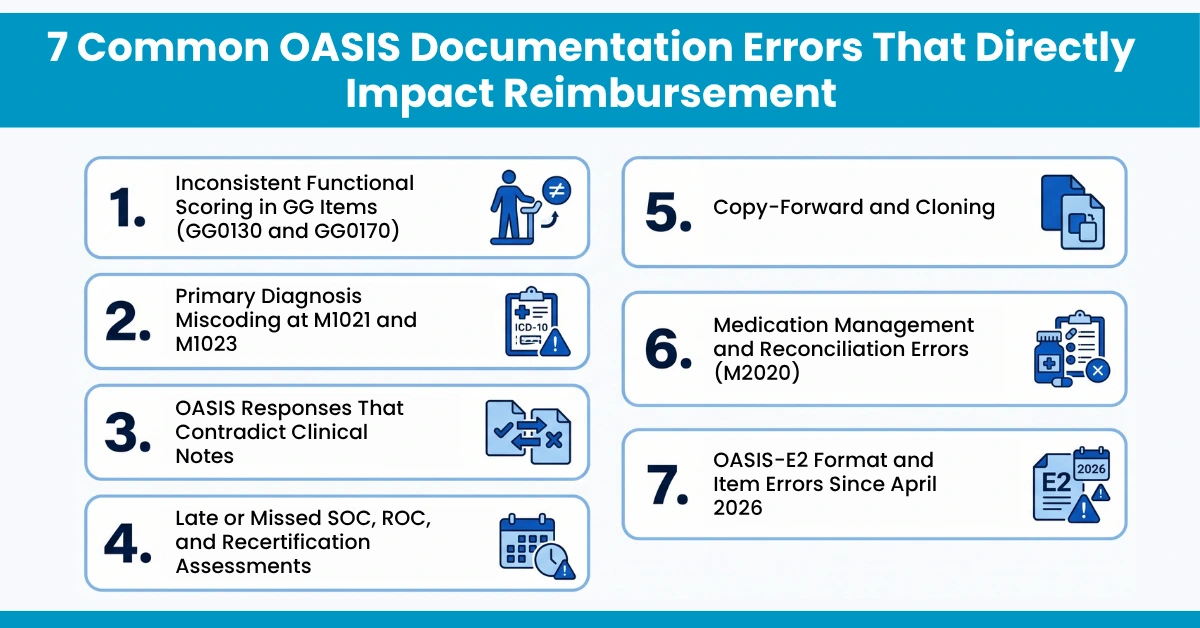
7 Common OASIS Documentation Errors That Directly Impact Reimbursement
These are the errors that show up most often in home health agencies, and the ones that hit your revenue the hardest.
1. Inconsistent Functional Scoring in GG Items (GG0130 and GG0170)
This is the #1 OASIS documentation mistake across the country. GG0130 tracks self-care. GG0170 tracks mobility. PDGM uses both to set your payment.
What goes wrong:
Clinicians score patients based on what they say, not what they observe
A nurse scores a patient as independent but the physical therapist’s notes say the patient needs help to walk
Over-scoring at SOC makes it look like the patient did not improve by discharge
Under-scoring creates overpayment risk and possible payback to CMS
How to fix it:
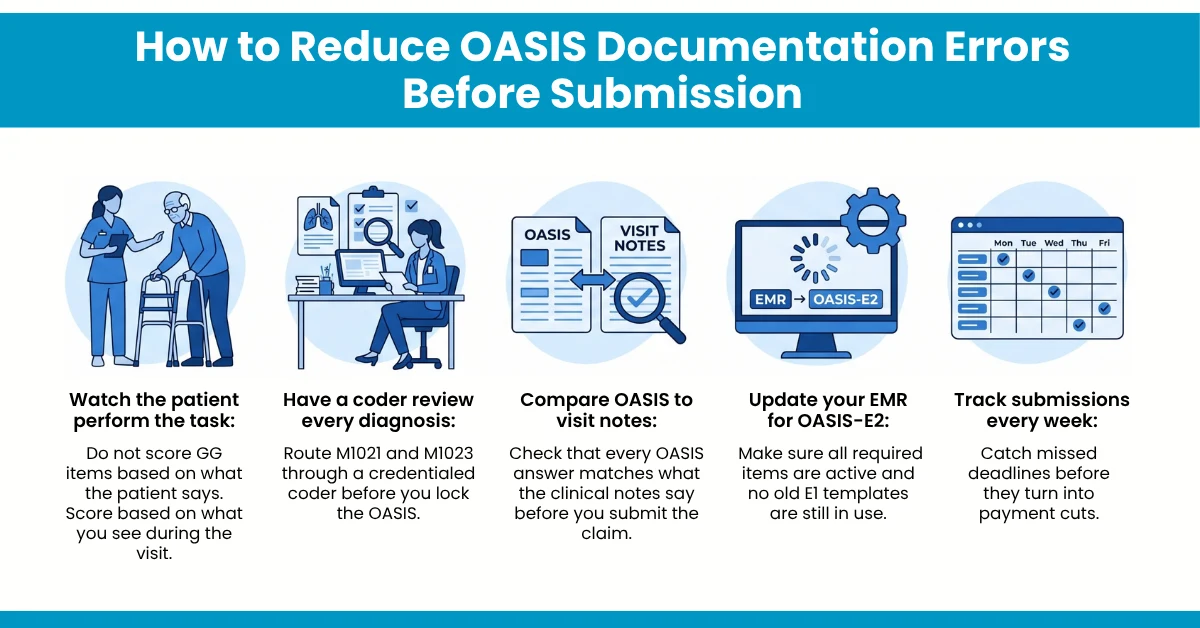
Watch the patient perform the task during the visit
Score based on what you see, not what the patient tells you
Make sure nursing and therapy scores match for the same patient
2. Primary Diagnosis Miscoding at M1021 and M1023
M1021 is where you enter the main reason the patient needs home health care. It drives your PDGM clinical group and your case-mix weight. Get it wrong and your entire 30-day payment drops.
What goes wrong:
Using symptom codes like R05 (cough) instead of the real diagnosis like J18.9 (pneumonia)
Putting Z-codes as the primary diagnosis, which triggers an ADR right away
Forgetting to list comorbidities at M1023, like missing N18.3 (chronic kidney disease) for a diabetic patient
Using vague codes like I10 (hypertension, unspecified) when more detail is available
How to fix it:
Have all entries of M1021 and M1023 reviewed by a credentialed coder prior to locking the OASIS
Assign the most specific ICD-10-CM code supported by the documentation.
List any co-morbidities impacting the patient’s care
3. OASIS Responses That Contradict Clinical Notes
This mismatch causes more survey problems than almost any other error. When your OASIS documentation says one thing and your visit notes say another, auditors take notice.
What goes wrong:
OASIS says the patient bathes independently, but the nurse’s note says the patient needs moderate help in the shower
M1311 says zero pressure ulcers, but the wound care note describes a Stage 2 ulcer
OASIS shows the patient at high fall risk, but no fall prevention steps appear in the care plan
How to fix it:
Run a side-by-side check between OASIS answers and visit notes before every claim goes out
Make sure the care plan matches what OASIS says about the patient’s risks
Train clinicians to write notes that support their OASIS scores
Agencies dealing with risinghome health billing costs from these mismatches often find the fix starts with better OASIS-to-note alignment.
4. Late or Missed SOC, ROC, and Recertification Assessments
Timing rules are strict. Miss a deadline and CMS flags the assessment as non-compliant.
What goes wrong:
SOC OASIS not completed within 5 days of admission (the most missed deadline in home health)
ROC assessments missing new OASIS-E2 items for Hearing, Vision, and Language
Recertification OASIS submitted outside the 5-day window
Assessments submitted past the 30-day iQIES deadline, so they do not count toward quality reporting
How to fix it:
Set EMR alerts for every OASIS due date
Track submissions weekly, not monthly
Double-check that ROC assessments include all OASIS-E2 required items
5. Copy-Forward and Cloning
Without Clinical Reassessment Some clinicians copy answers from a previous OASIS instead of reassessing the patient. This creates records that do not match the patient’s current condition.
What goes wrong:
Some items get updated but others stay the same, creating contradictions
One section says the patient needs total help while another says they manage on their own
CMS auditors treat cloned records as a documentation integrity red flag
How to fix it:
Never copy-forward without reviewing every single item
Treat each assessment as a fresh evaluation of the patient’s current status
Train staff that cloning is an audit risk, not a time-saver
6. Medication Management and Reconciliation Errors (M2020)
M2020 asks whether the patient can take the right medicine at the right dose at the right time. It does not ask whether the patient can name their pills.
What goes wrong:
Clinicians score independent because the patient recognizes their medications, even though the patient still needs reminders to take them
Medication lists in OASIS do not match the clinical record
New prescriptions or stopped medications are not updated
How to fix it:
Score based on the patient’s ability to manage medications safely, not just identify them
Reconcile the medication list at every visit
Update OASIS whenever medications change
7. OASIS-E2 Format and Item Errors Since April 2026
OASIS-E2 replaced E1 on April 1, 2026. Many agencies are still working through the changes.
What goes wrong:
EMR systems not updated to E2 specifications, causing edit errors and rejected submissions
A1255 replaces A1250 for race and ethnicity, but old templates still use A1250
M0069 replaced with A0810, and O0350 removed, but staff still look for the old items
A1110, B0200, and B1000 now required at ROC, but clinicians skip them
How to fix it:
Confirm with your EMR vendor that all OASIS templates are updated to E2
Train staff on every item change between E1 and E2
Common OASIS documentation errors silently drain your agency’s revenue, one wrong score, one missed deadline, one mismatched note at a time. Fix them before submission, not after the denial arrives. HelloMDs provides home health billing services that connect your OASIS data to every claim your agency submits.
Disclaimer
This article references guidance from CMS, the CY 2026 Home Health Final Rule, and the OASIS-E2 Guidance Manual. We used AI assistance for research, editing, and writing support. All images are AI-generated. Clinical and billing information should be verified against current CMS sources before making operational decisions.
The most common errors are wrong functional scores in GG items, miscoded diagnoses at M1021, OASIS answers that do not match clinical notes, late SOC or ROC submissions, and copied data that was never reassessed.
OASIS answers decide your clinical group, functional level, and comorbidity score. A mistake in any of these changes your HIPPS code and changes how much Medicare pays you for the entire 30-day episode.
Errors can lead to document requests from your MAC, claim denials, lower payments, and audit exposure. Errors that affect quality measures also hurt your Star Ratings on the CMS Home Health Quality Reporting Program.
The best agencies check OASIS before every claim, review data at the agency level every month, and test scoring consistency across their clinical team every quarter.
When your OASIS data does not match your claim, payers deny it. A wrong diagnosis creates the wrong HIPPS code. Mismatched functional scores trigger document requests. MAC reviewers deny claims when OASIS does not support the services you billed.